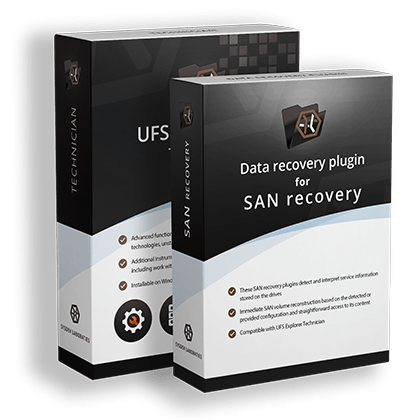
Plugins for SAN recovery
are specialized add-ons designed to facilitate data recovery operations on popular SAN systems. Seamlessly integrating with UFS Explorer Technician, the plugins automate the reconstruction of complex configurations used by various SAN platforms and provide direct access to the contained virtual volumes. As a result, technical experts can quickly examine the contents and begin data retrieval without having to dive into the specifics of the underlying storage structure.
Straightforward recovery from complex SAN infrastructures
Each plugin is tailored to the architecture of the respective storage platform, enabling recovery specialists to handle SAN data loss more efficiently, without spending time on manual analysis of complex proprietary layouts.
SAN storage arrays typically rely on multiple layers of virtualization, storage pools and proprietary RAID implementations. Data recovery from such systems usually requires tedious reconstruction of the internal configuration before any file system analysis can begin. These SAN recovery plugins detect and interpret service information stored on the drives, automatically rebuilding supported storage configurations. Consequently, SAN virtual volumes become available in the software interface for further access and data extraction.
Each plugin is developed with the architecture of a particular SAN platform in mind. This includes support for the proprietary metadata structures, storage pool organization methods and virtualization mechanisms used by the respective vendor. By taking these characteristics into account, the plugins can recognize the storage layout and reproduce it correctly, enabling access to the data stored within virtual volumes. This approach eliminates the need for additional adjustments and reduces the time and effort required for SAN recovery.
These modules allow technical experts to combine automated SAN reconstruction with the advanced data recovery capabilities already available in the software. Once the storage configuration is assembled by means of a plugin, the available volumes can be searched, scanned and recovered using the full range of tools provided by the application. The chosen plugin becomes accessible through the list of plugins in UFS Explorer Technician following a quick activation process and can be managed via an embedded plugin manager.
Additional modules for different SAN solutions
The line of SAN recovery plugins includes components designed for various SAN storage platforms commonly used in corporate environments and data centers.

This plugin recognizes Dell EqualLogic SAN metadata and interprets it to reconstruct both the current and previously applied storage array configurations.
If severe corruption prevents automatic reconstruction, specialists can define the underlying RAID sets manually and import superblock or metadata copy files.
Before starting data recovery, users can examine the content of detected volumes and evaluate their condition using a built-in file system preview tool.
Once the required EqualLogic SAN configuration is selected, the plugin grants immediate access to the restored volumes and snapshots, allowing users to complete the recovery procedure.
The plugin reads metadata describing the Vraid layout and employs it to reconstruct the available configuration versions, including disk groups, redundancy and other settings.
When certain Vraid components are not operational, the software applies redundancy mechanisms inherent to the corresponding Vraid scheme (for Vraid1, Vraid5 and Vraid6).
The plugin provides a dedicated tool that allows users to inspect the file system content of detected volumes before initiating the recovery process.
The reconstructed HP EVA SAN virtual volumes can be opened within the interface of UFS Explorer Technician and processed like any ordinary storage device.

The plugin identifies metadata associated with HPE MSA storage pools and gathers all parameters required to reconstruct the SAN configuration.
When some drives within a disk group are not available, the software applies the redundancy mechanisms inherent to the corresponding RAID scheme.
Before initiating data recovery, users can quickly explore the file system structure and evaluate the condition of detected volumes using a built-in preview tool.
Reconstructed HPE MSA volumes are mounted in the interface of UFS Explorer Technician and become available for further recovery operations.

The plugin interprets service information stored on the SAN member drives and uses it to reconstruct the necessary HPE 3PAR storage pool configuration.
When certain physical disk chunklets are missing from the assembly, the software applies redundancy mechanisms of the deployed RAID scheme (for redundant CPGs only).
Before recovery, users can easily inspect the file system content of reconstructed virtual volumes with the help of an embedded preview tool.
Once the required volume is restored, it can be opened directly in UFS Explorer Technician for further analysis and data extraction.

The plugin interprets metadata of Engenio-based storage systems (such as Dell PowerVault MD3, IBM DS3 and NetApp E-Series) and uses it to reconstruct the respective SAN configuration.
If redundancy is available at the disk group level, the software applies the inherent RAID mechanisms when failed drives cannot participate in the SAN reconstruction.
An embedded preview tool allows users to examine the directory structure and content of detected volumes before initiating the recovery process.
Once the necessary configuration is restored, the available SAN volumes can be opened for data recovery operations directly in the interface UFS Explorer Technician.

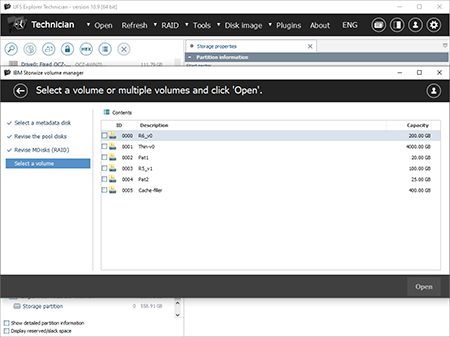
The plugin detects metadata describing the storage pools on IBM Storwize systems and uses it to properly reconstruct their layout.
When some drives are unavailable within a redundant configuration, the software automatically applies the redundancy mechanisms inherent to the corresponding RAID scheme.
Before starting recovery, users can review the file system structure and content of detected volumes using the built-in preview functionality.
After successful IBM Storwize SAN reconstruction, the virtual volumes become available for subsequent processing in UFS Explorer Technician.